
Showing posts with label .NET Framework 4. Show all posts
Showing posts with label .NET Framework 4. Show all posts
Tuesday, October 26, 2010


Friday, June 11, 2010
Microsoft Expression Blend 4 SDK for .NET 4
Microsoft Expression Blend 4 includes new built-in behaviors, which are reusable pieces of packaged code that can be dragged onto any object, and then fine-tuned by changing their properties. Behaviors allow you to add interactivity to your applications without having to write any code. The Behavior API consists of three core classes: Trigger, Action and Behavior. This SDK explores how to write each of these components, and contains a few code samples to help you get started. Programming reference topics are provided for Windows Presentation Foundation (WPF). For more how-to and overview information about behaviors in Expression Blend, see the Expression Blend User Guide, available when you install Expression Blend 4.
The Expression Blend 4 SDK also contains the following redistributable components:
1. SketchFlow Player
2. Custom VSM for Fluid Layout
3. Font Embedding enhancements
4. Effects and Transition Effects
5. Shapes
The Expression Blend 4 SDK is required to edit an Expression Blend 4 project that uses any of these components if Expression Blend 4 is not installed.
Download BlendWPFSDK_en.msi
2. Custom VSM for Fluid Layout
3. Font Embedding enhancements
4. Effects and Transition Effects
5. Shapes
The Expression Blend 4 SDK is required to edit an Expression Blend 4 project that uses any of these components if Expression Blend 4 is not installed.
Download BlendWPFSDK_en.msi
Thursday, December 24, 2009
Microsoft Visual Studio 2010 Beta 2
 Microsoft Visual Studio 2010 Ultimate provides an integrated environment of tools and server infrastructure that simplifies the entire application development process. Deliver business results using productive, predictable, customizable processes and increase transparency and traceability throughout the lifecycle with detailed analytics. Whether creating new solutions or enhancing existing applications unleash your creativity with powerful prototyping, architecture and development tools that let you bring your vision to life targeting an increasing number of platforms and technologies including cloud and parallel computing. Realize increased team productivity by utilizing advanced collaboration features and use integrated testing and debugging tools to find and fix bugs quickly and easily ensuring high quality solutions while driving down the cost of solution development.
For more information on Visual Studio 2010 and the .NET Framework 4 visit
This virtual machine does not have anti-virus installed. It should not be connected to any network until it has anti-virus installed. In addition, the operating system and programs installed were patched with all updates as of December 10, 2009.
Download Details:
Friday, December 4, 2009
Parallel Extensions - .NET Framework 4
The .NET Framework 4 includes extended support for writing parallel applications, through enhancements to the CLR itself as well as through new libraries commonly referred to as "Parallel Extensions to the .NET Framework." The set of articles available in this download provides detailed information on Parallel Extension, including the Task Parallel Library (TPL), Parallel LINQ (PLINQ), and a set of new coordination primitives and thread-safe data structures. These articles provide insights into performance characteristics, usage patterns, best practices, integration of parallelism with other programming frameworks, and more.
Download ParentChildTPLTasksRelationship.pdf
This document provides an in-depth explanation on parent-child task relationships offered by the Task Parallel Library as in the .NET Framework 4. This includes the behavioral changes implied by being a parent or child task in terms of task completion, task waiting, as well as task cancellation. In addition, it also points out a few common oversights and provides general guidelines on when to take advantage of this feature.
Friday, November 27, 2009
The Evolution of Visual Basic
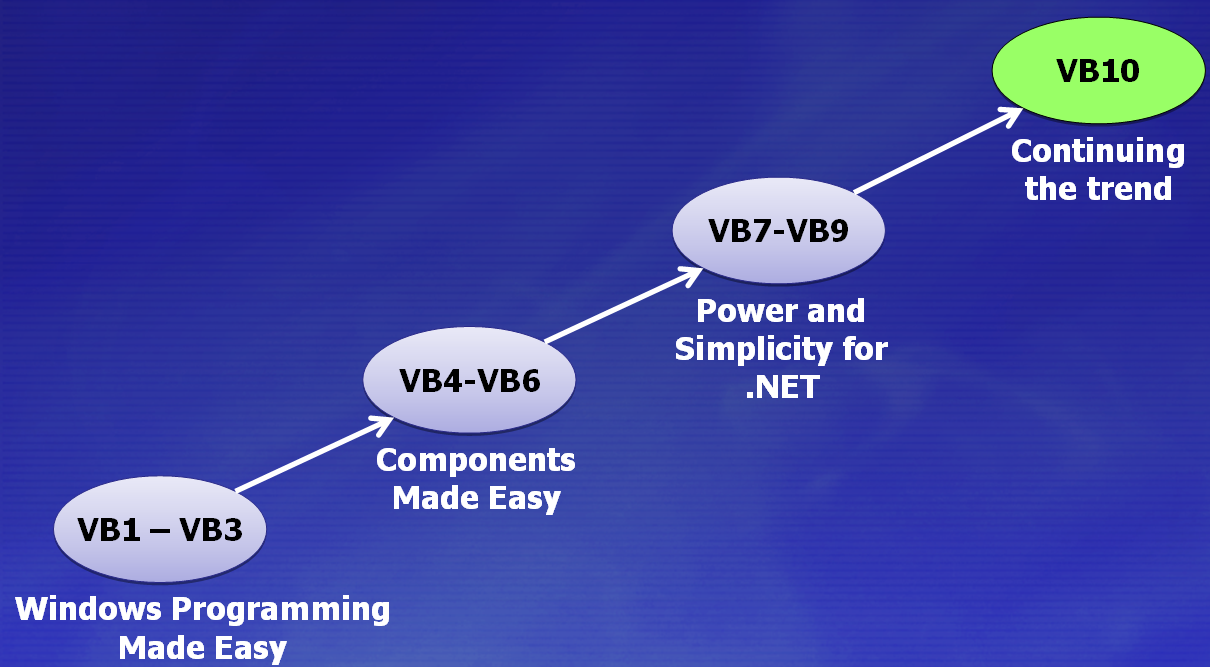
Visual Basic 1 – Visual Basic 3:
- Made Windows programming accessible
- Helped make Windows the premier platform in the world
Visual Basic 4 – Visual Basic 6:
- Made targeting COM and OLE approachable for most developers
Visual Basic 7 – Visual Basic 9:
- Bringing the "ease of use" to the .NET platform
- Helped establish the CLR as the premier managed runtime in the world
Visual Basic 10:
- Continuing this trend to make it easy to use and leverage the platform
The Evolution of C#

C# 1.0:
With the launch of the C# language, it was a major shift we took to a full managed environment. This was a big step for programming languages at Microsoft.
C# 2.0:
With the second release of C# we introduced fully reified Generics into the language. This was a very powerful addition to the type system.
C# 3.0:
C# 3.0 introduced LINQ which we talked about previously
C# 4.0:
Not just “dynamic” as in late-binding, but those features that allow the compiler to “get out of the developer’s way”.
Friday, November 13, 2009
MSMQ Activation for WCF Workflow Service Application
This article describes how to set up MSMQ activation for WCF Workflow Service Application hosted in Windows Activation Service (WAS).In .NET Framework 4 and Visual Studio 2010, you can build pure Windows Communication Foundation (WCF) services, pure Workflow Foundation (WF) applications, or a workflow service, which is a workflow application exposed as a WCF service. The out-of-box messaging activities, e.g. Send and Receive activities, come with implicit WCF endpoints, which can be employed for external communication to the workflow, including WCF activation of the workflow instance when the first message arrives. A workflow service, like any application with a communication component, can benefit from the advantages of queuing technologies. Adding a queue element to application design can improve robustness. The queue can also provide load-balancing support and improve scalability.
Download HowToSetUpMSMQActivation.docx
Thursday, October 22, 2009
WCF and WWF Samples for .NET Framework 4.0 Beta 2
Microsoft released the samples of Windows Communication Foundation (WCF) and Windows Workflow Foundation (WF) for .NET Framework 4.0 Beta 2.
For More Details about all the samples, have a look at this documentation available in the following link Documentation
Download WF_WCF_Samples.exe
Wednesday, October 21, 2009
Download VS 2010 and .NET Framework 4.0 Training Kit Beta 2
The Visual Studio 2010 and .NET Framework 4 Training Kit includes presentations, hands-on labs, and demos.
This content is designed to help you learn how to utilize the Visual Studio 2010 features and a variety of framework technologies including:
- C# 4.0
- Visual Basic 10
- F#
- Parallel Extensions
- Windows Communication Foundation
- Windows Workflow
- Windows Presentation Foundation
- ASP.NET 4
- Windows 7
- Entity Framework
- ADO.NET Data Services
- Managed Extensibility Framework
- Visual Studio Team System
This version of the Training Kit works with Visual Studio 2010 Beta 2 and .NET Framework 4 Beta 2.
Download VS2010TrainingKitSetup.exe
Thursday, July 30, 2009
.NET Framework 4 Beta 1 enabled to use Software Transactional Memory
 Software Transactional Memory (STM.NET) is a mechanism for efficient isolation of shared state. The programmer demarcates a region of code as operating within a transaction that is “atomic” and “isolated” from other transacted code running concurrently. Transactional memory is considered a promising technology by the academic community and is repeatedly brought up as a welcome technology for the upcoming wave of applications which scale on modern multi-core hardware. The goal is to be able to exploit concurrency by using components written by experts and consumed by application programmers who can then compose together these components using STM. Transactional memory provides an easy-to-use mechanism to do this safely. STM is not a 1:1 lock replacement and provides more functionality than critical sections, reader-writer locks, and other traditional synchronization methods. This functionality has overhead; the hope is that the scalability, productivity, and deadlock freedom gained by this mechanism outweigh the degradation in serial performance. This is an experimental release of the .NET Framework that allows C# programmers to try out this technology, specifically a particular implementation of STM. We are interested in your feedback on your experience using this programming model. Is it valuable and easy-to-use? Does it provide enough functionality? Are you willing to pay with serial performance losses to gain greater scalability? Our implementation is integrated with the framework and tools, it has been extended to provide coexistence with locks, interoperate with traditional transactional technologies, and safely work with existing code.
Download STM.NET Version 1.0
Subscribe to:
Posts (Atom)