For SQL Server 2005:
1 Clustered Index + 249 Nonclustered Index = 250 Index
http://msdn.microsoft.com/en-us/library/ms143432(SQL.90).aspx
For SQL Server 2008:
1 Clustered Index + 999 Nonclustered Index = 1000 Index
http://msdn.microsoft.com/en-us/library/ms143432.aspx
Reference: http://blog.sqlauthority.com/2009/06/29/sql-server-maximum-number-of-index-per-table/
Showing posts with label Microsoft SQL Server 2008. Show all posts
Showing posts with label Microsoft SQL Server 2008. Show all posts
Wednesday, June 23, 2010


Tuesday, April 27, 2010
Microsoft SQL Server Native Client
Microsoft SQL Server Native Client is DLL, it provides an access to the SQL Database. This DLL contains both the SQL OLE DB provider and SQL ODBC driver. This helps to connect Microsoft SQL Server 7.0/2000/2005/2008.
Download Microsoft SQL Server Native Client from the given link
SQL Server Native Client 2005:
X86 Package
X64 Package
IA64 Package
SQL Server Native Client 2008:
X86 Package
X64 Package
IA64 Package
Download Microsoft SQL Server Native Client from the given link
SQL Server Native Client 2005:
X86 Package
X64 Package
IA64 Package
SQL Server Native Client 2008:
X86 Package
X64 Package
IA64 Package
Friday, November 20, 2009
Enable FileStream in SQL Server 2008
Problem:
Today I tried to install Sample database of "Adventure works 2008" in my system, then it throws the error like…
"AdventureWorks2008 OLTP requires FILESTREAM which is not enabled for the instance you selected. FILESTREAM must be enabled BOTH via the Sql Server configuration Manager and via Management Studio for this instance."

Solution:
This Error Message itself provides the solution for the problem. We have to enable FILESTREAM in two locations. One is SQL Server Configuration Manager and other location via SQL Server Management Studio (SSMS). Here I explained that "how and where we have to enable the FILESTREAM"
SQL Server Configuration Manager:
- Go To Start --> Programs --> Microsoft SQL Server 2008 --> Configuration Tools --> SQL Server Configuration Manager
- Right Click on the SQL Server Services Instance, Then Select Properties
- Go To FILESTREAM Tab
- Check Enable FileStream, as shown in the Exhibit
- Click Apply
- Restart SQL Server Services


SQL Server Management Studio (SSMS):
- Right Click on the SQL Server Database, Select Property
- In Advanced Section, Select FileStream Access Level to "Full Access Enabled"
- Select Ok
- Restart SQL Server Services again


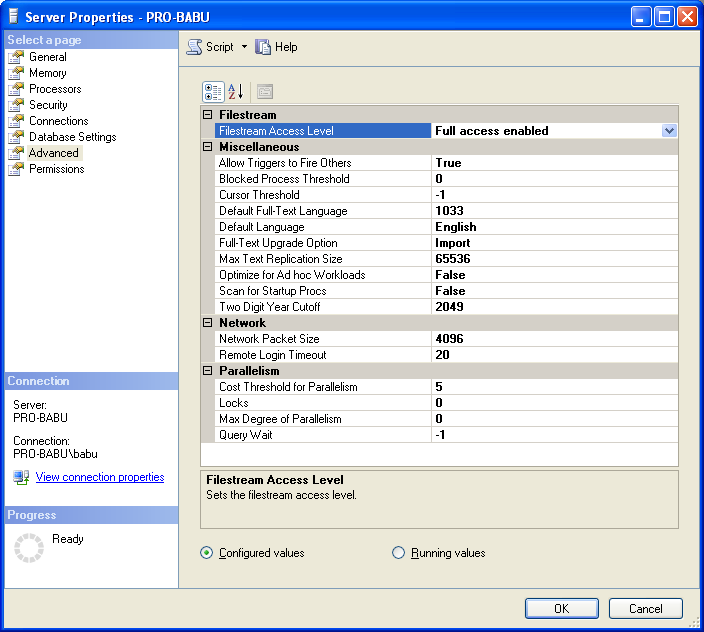
After Enabled FileStream in the given two locations, I continued my installation, it is installed well.
Microsoft SQL Server 2008 Books Online (July 2009)
SQL Server 2008, the latest release of Microsoft SQL Server, provides a comprehensive data platform. Books Online is the primary documentation for SQL Server 2008.
Books Online includes the following types of information:
Setup and upgrade instructions.
Information about new features and backward compatibility.
Conceptual descriptions of the technologies and features in SQL Server 2008.
Procedural topics describing how to use the various features in SQL Server 2008.
Tutorials that guide you through common tasks.
Reference documentation for the graphical tools, command prompt utilities, programming languages, and application programming interfaces (APIs) that are supported by SQL Server 2008.
Descriptions of the sample databases and applications that are available with SQL Server 2008. You can download the sample databases from the SQL Server Community Projects and Samples page on CodePlex.
NOTE: Non-English installs of Books Online may encounter minor issues. To address these issues try rerunning the installation.
Download SQLServer2008_BOLOct2009.msi
Subscribe to:
Posts (Atom)