Search this blog

Showing posts with label SQL Server. Show all posts

Monday, June 15, 2015

Deprecated/Discontinued DBEngine Features in SQL Server 2014

As we all aware, each and every new release of any software, we might expect changes in the release like, new features, update/upgrade on the existing features, outdated features due to compatibilities or alternate options.
 
The below link provides the list of the features and functionality that Microsoft is dropping from SQL Server 2014,
 

Wednesday, June 10, 2015

SQL Server 2016 CTP 2

Microsoft has released the first public preview of SQL Server 2016 Community Technology Preview 2. This version delivered with faster transactions and queries, deeper insights on any device, advanced analytics, new security technology, and new hybrid cloud scenarios, etc., Also find the other benefits below,
 
Benefits:
  • Enhanced in-memory performance provide up to 30x faster transactions, more than 100x faster queries than disk based relational databases and real-time operational analytics
  • New Always Encrypted technology helps protect your data at rest and in motion, on-premises and in the cloud, with master keys sitting with the application, without application changes
  • Built-in advanced analytics– provide the scalability and performance benefits of building and running your advanced analytics algorithms directly in the core SQL Server transactional database
  • Business insights through rich visualizations on mobile devices with native apps for Windows, iOS and Android
  • Simplify management of relational and non-relational data with ability to query both through standard T-SQL using PolyBase technology
  • Stretch Database technology keeps more of your customer’s historical data at your fingertips by transparently stretching your warm and cold OLTP data to Microsoft Azure in a secure manner  without application changes
  • Faster hybrid backups, high availability and disaster recovery scenarios to backup and restore your on-premises databases to Microsoft Azure and place your SQL Server AlwaysOn secondaries in Azure

Monday, March 5, 2012

SQL Database File Extensions

The database file extensions .mdf and .ldf are quite straightforward.

Data files are organized in logical groups called filegroups (FG). Filegroups are your way to control what will be the physical locations of your objects. A database must have at least one filegroup called PRIMARY, and optionally other user filegroups as well. The PRIMARY filegroup contains the primary data file (extension .mdf), and the database's system catalog.

You can optionally add secondary data files (extension .ndf) to PRIMARY. User filegroups contain only secondary data files. You can determine which of the filegroups is marked as the default filegroup. An object is created on the default filegroup when the object creation statement does not explicitly specify the target filegroup. 

For Example: Database Partition

.ldf stands for Log Data File. Although SQL Server can write to multiple data files in parallel, it can only write to one log file at a time, in a sequential manner. Therefore, unlike with data files, having multiple log files does not result in performance benefit. You might need to add log files if the disk drive where the log resides runs out of space.

Reference: Microsoft® SQL Server® 2008 T-SQL Fundamentals by Itzik Ben-Gan

Saturday, February 18, 2012

The History of SQL Server

This history of SQL Server goes back to 1989 and this video covers each of the SQL Server releases up to the new SQL Server 2012

Friday, April 8, 2011

What is Denali?

Denali is code name of SQL Server 2011.

Here is the list of the code name of other versions of SQL Server.

In 1988, Microsoft released its first version of SQL Server. It was developed jointly by Microsoft and Sybase for the OS/2 platform.

1993 – SQL Server 4.21 for Windows NT
1995 – SQL Server 6.0, codenamed SQL95
1996 – SQL Server 6.5, codenamed Hydra
1999 – SQL Server 7.0, codenamed Sphinx
1999 – SQL Server 7.0 OLAP, codenamed Plato
2000 – SQL Server 2000 32-bit, codenamed Shiloh (version 8.0)
2003 – SQL Server 2000 64-bit, codenamed Liberty
2005 – SQL Server 2005, codenamed Yukon (version 9.0)
2008 – SQL Server 2008, codenamed Katmai (version 10.0)
2010 – SQL Server 2008 R2, Codenamed Kilimanjaro (aka KJ)
2012– SQL Server 2012, Codenamed Denali (version 11.0)

Books Online - SQL Server Code-Named "Denali"

Books Online includes
  • Setup and upgrade instructions.
  • Information about new features and backward compatibility.
  • Conceptual descriptions of the technologies and features in SQL Server.
  • Procedural topics describing how to use the various features in SQL Server.
  • Tutorials that guide you through common tasks.
  • Reference documentation for the graphical tools, command prompt utilities, programming languages, and application programming interfaces (APIs) that are supported by SQL Server.
  • Descriptions of the sample databases and applications that are available with SQL Server.
Download - Books Online SQL Server Code-Named "Denali"

Wednesday, December 29, 2010

Truncate Within A Transaction

In the previous post, we have seen, what is the difference between in “Truncate vs. Delete”?


Actually if we use truncate then we can’t rollback the data, but the question is … What will happen if we use truncate within a transaction, Whether we can rollback or not?.


The following example reveals the answer for our question.


I created a table and inserted a rows, as shown below


Then I executed the below Query:


It Returns:

Conclusion:
Truncated Data can be roll backed if it is executed within a transaction

Truncate Vs Delete

Truncate

Delete

Truncate Table <Table Name>

Delete from <Table Name> Where <Condition>

Cannot use Where Condition

It is possible

It Removes all the data

It deletes specified data if where condition exists.

Faster in performance wise, because it doesn't keep any logs

Slower than truncate because, it keeps logs

Rollback is not possible

Rollback is possible

Wednesday, December 15, 2010

PL/SQL vs. T-SQL

PL/SQL (Procedural Language/Structured Query Language) is Oracle Corporation's procedural extension language for SQL and the Oracle relational database.


Transact-SQL (T-SQL) is Microsoft's and Sybase's proprietary extension to SQL. Transact-SQL is central to using SQL Server. All applications that communicate with an instance of SQL Server do so by sending Transact-SQL statements to the server, regardless of the user interface of the application.

Friday, October 15, 2010

Extract Only Date from Date time field

Today, one of my friend asked me, how to extract only Date from Datetime field.

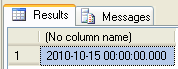
The following SQL Script helps to Extract only Date from DateTime field, it will ignore the time and display as "00:00:00.000".

SELECT DATEADD(dd, 0, DATEDIFF(dd, 0, GETDATE()))
Here I used the GetDate() function. In the Same way, we can use any datefield column.
There are other ways also there, but datatype and Dateformat is different

Select convert(varchar, getdate(), 101)


Select convert(varchar, getdate(), 102)

Select convert(varchar, getdate(), 103)

Select convert(varchar, getdate(), 104)

Select convert(varchar, getdate(), 105)

Select convert(varchar, getdate(), 106)

Select convert(varchar, getdate(), 107)

Wednesday, October 6, 2010

Error: SQL Server Native Client cannot be found

Problem:
Today I tried to install SQL Server 2005 Developer edition in my system. During the installation, it throws the given error:


---------------------------
Microsoft SQL Server 2005 Setup
---------------------------
An installation package for the product Microsoft SQL Server Native Client cannot be found. Try the installation again using a valid copy of the installation package 'sqlncli.msi'.
---------------------------
OK
---------------------------

Cause:
System already contains another version of "SQL Server Native Client". So that it throws the error.

Solution:
Uninstall "SQL Server Native Client" thru "Add and Remove Programs"
Re-install SQL Server 2005 Again

Thursday, July 8, 2010

SQL Vs. T-SQL

Structured Query Language (SQL)
Transact-SQL (T-SQL)
ANSI/ISO Standard DB Language
SQL Server's Implementation of Language
Simple SQL Statements. Managing Data
Extension of SQL. Combination of Multiple Transactions sing multiple SQL Commands
Control Flow Language. It controlled by…

IF and ELSE
BEGIN And END
WAITFOR
RETURN
BREAK
WHILE
CONTINUE

DELETE OR UPDATE can be used with FROM & JOIN Clause
BULK INSERT

Tuesday, June 29, 2010

Functions (UDF) Vs Stored Procedures (SP)

Functions (UDF)
Stored Procedures (SP)
Execute Functions thru SQL Statement
It Can not be used in SQL Statements
UDF run thru SQL SELECT
SP run thru EXECUTE OR EXEC
You can't use DDL, DML statements in UDF
It is possible in SP
It always return values
It May or May not return value
UDF return single resultset
SP can return multiple resultset
Function can't return XML output
SP can return XML output
UDF can have only Input Parameter
SP can have Input & Output Parameter
SP can not call thru Functions
Function can be called from SP
Exception handling is not Possible
Exception Handling is possible

Composite Key / Concatenated Key / Aggregate Key:

Composite Key is a primary key, combination of more than one column to maintain unique record. It is also known as Concatenated Key or Aggregate Key

For example:

CREATE TABLE InvoiceDetails (
      InvoiceNo numeric(18,0),
      itemNumber numeric(18,0),
      productId  int,
      quantity   numeric(18,2),
      PRIMARY KEY (InvoiceNo, itemNumber))

InvoiceDetails table may have a composite key on InvoiceNo & itemNumber

Referential integrity

It is a Database concept, it maintain the consistent relation between parent and child tables. When one table contains FK, it may not allow inserting any values in key columns of the child tables which is not existed in parents table. It supports cascading update and cascading delete, which ensures the changes made to the child table will be reflected in parent table as well.

How to List All the Databases from SQL Server

You can use any of the following queries to retrieve list of all databases

SELECT name FROM sys.databases
SELECT name FROM sys.sysdatabases

Or you can use the following system stored procedure

EXEC sp_databases
EXEC sp_helpdb

Thursday, June 24, 2010

Differences between COALESCE and NULLIF


COALESCE
NULLIF
It Accepts N Parameters, It returns first Not Null Values

For Example:-
select coalesce(NULL,2,NULL,3)
Output :- 2
It Accepts 2 Parameters, if both are not equal then it will return first value.

For Example:-
SELECT NULLIF(1,2)
Output :- 1
First argument can be NULL, but both argument can not NULL value
First argument can not be NULL input
If Both argument are equal, then it will return first value.

For Example:-
SELECT NULLIF(2,2)
Output :- 2
If Both argument are equal, then it will return NULL value.

For Example:-
SELECT NULLIF(2,2)
Output :- NULL

Forms Of Normalization

This is continuation of my previous post "What is Normalization"


I hope following Brief Notes about Normalization will be helpful to you,

First Normal Form (1NF): 
·         No repeating group of data items
·         Each column should contain specific values
·         Each row is equivalent logical record
·         Relation should contains records of identical format

Second Normal Form (2NF):
·         Foreign Key Relation Ship
·         Each data items in a record is functionally dependent on the key of that record
·         Each record uniquely identified with the Key
·         No Redundant data
·         It should full fill the 1NF

Third Normal Form (3NF):
·         First Full fill second normal form
·         Example Fact Table
·         All non-key functionally dependent on primary key

Boyce-Codd Normal Form (BCNF):
·         Eliminate redundancy
·         It adheres both 2NF AND 3NF

Fourth Normal Form (4NF):
·         Eliminate multi dependency

Fifth Normal Form (5NF):
·         Eliminate cyclic dependency

Sixth Normal Form (6NF):
·         It satisfies No Non Trivial join at all,
·         Extending relational model, temporal dimensions

Domain Key Normal Form (DKNF):
·         No constraints other than domain constraints