Search this blog

Showing posts with label SQL Server 2008. Show all posts

Wednesday, November 23, 2011

SQL:Generate Script for Table Data

Today, one of my colleague asked me, how to generate a Script for a table-schema as well as data-Schema?

Whatever I explained to him, I thought to share the same in my blog as well, hope it helps to someone!!!

Most of you are aware that we can generate T-SQL scripts for multiple or individual objects by using the "Generate Scripts” Wizard thru Object Explorer.

You can also generate a script for data as well, the following steps will explain you, how to generate the Script for Table Schema with Data.

1. Right Click on Database (in which you want to extract schema for Data) >> Tasks >> Generate Scripts >>

2. “Generate Scripts” wizard will be appearing with 5 Tabs like
  • Introduction
  • Choose Objects
  • Set Scripting Options
  • Summary
  • Save or Publish Scripts
By default, it is pointing to Introduction Tab

Note:  if you want to skip the Introduction Page from next usage of this wizard, then you can check the option “Do Not Show this Page Again”. After this setting, if you open the “Generate Scripts” wizard, by default it will point to
“Choose Objects” Tab.

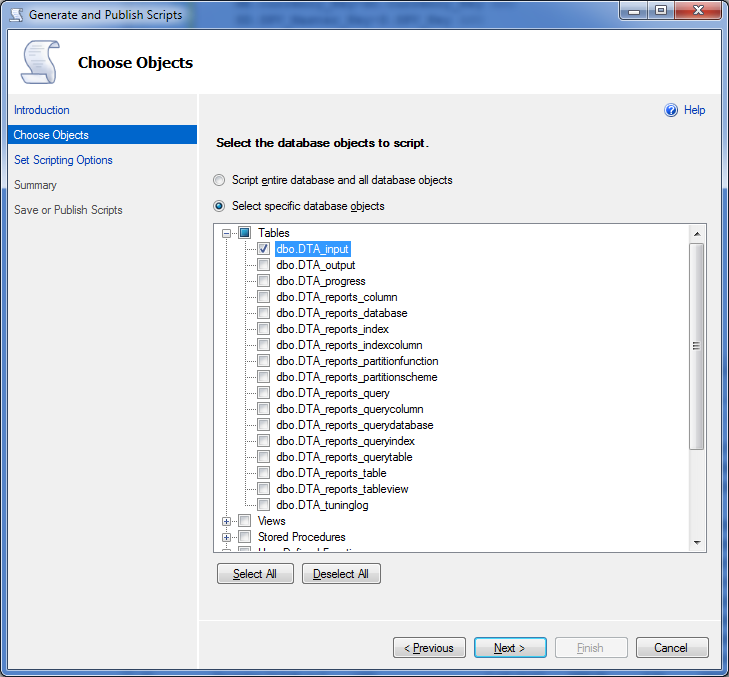
3. Click on the button “Next” to redirect to “choose Objects” Tab.“Choose Objects” Page has following two options
  • Script entire database and all database objects (Default Option)
  • Select Specific Objects
By Default, it will be pointing to Entire Database Option (#1). If you want to create a script for specific table then check the second option as exhibit below.

4. After Specific SQL Objects, Click on the “Next” button to redirect to “Set Scripting Options” Tab, here follow the 2 steps
  • Specify the output path of the script file in File name Text box (refer the exhibit which is marked with maroon color box)
  • Click on the Advanced Button

Model popup will appear with list of options which are categorized as General and Table/View Options
Under General category, Find the option labeled as “Type of data to Script” (see the exhibit below), this option has following 3 values
  • Schema Only (Default Option)
  • Schema and Data
  • Data Only
Select it accordingly based on your requirement. Once you select the appropriate option, click on the OK button in the model popup window

Note: Choose “Schema and Data” option to generate the script for Schema as well as Data.

5.Click on Next Button to redirect Next Tab which is named as “Summary”, here you can review/verify all your selection and settings.
6.After review your setting, Select Next generates the script.
7.Click on the Finish Button after the status of selected action says success.
 
8.Check the Path which you specified on step 4(a), you can see file with “.sql” extension.
Note: If there is no record in the selected table then wizard will extract only schema.

Sample Output File:

Thursday, November 17, 2011

Maximum Capacity of DB Engine Objects


The following table shows what is the maximum size/number of objects can be created/Used in DB Engine by thru wizard or by T-SQL Statements
SQL Server Database Engine object
Maximum sizes/numbers SQL Server (32-bit) Maximum sizes/numbers SQL Server (64-bit)
Batch size1 65,536 * Network Packet Size 65,536 * Network Packet Size
Bytes per short string column 8000 8000
Bytes per GROUP BY, ORDER BY 8060 8060
Bytes per index key2 900 900
Bytes per foreign key 900 900
Bytes per primary key 900 900
Bytes per row8 8060 8060
Bytes in source text of a stored procedure Lesser of batch size or 250 MB Lesser of batch size or 250 MB
Bytes per varchar(max), varbinary(max), xml, text, or image column 2^31-1 2^31-1
Characters per ntext or nvarchar(max) column 2^30-1 2^30-1
Clustered indexes per table 1 1
Columns in GROUP BY, ORDER BY Limited only by number of bytes Limited only by number of bytes
Columns or expressions in a GROUP BY WITH CUBE or WITH ROLLUP statement 10 10
Columns per index key7 16 16
Columns per foreign key 16 16
Columns per primary key 16 16
Columns per nonwide table 1024 1024
Columns per wide table 30000 30000
Columns per SELECT statement 4096 4096
Columns per INSERT statement 4096 4096
Connections per client Maximum value of configured connections Maximum value of configured connections
Database size 524,272 terabytes 524,272 terabytes
Databases per instance of SQL Server 32767 32767
Filegroups per database 32767 32767
Files per database 32767 32767
File size (data) 16 terabytes 16 terabytes
File size (log) 2 terabytes 2 terabytes
Foreign key table references per table4 253 253
Identifier length (in characters) 128 128
Instances per computer 50 instances on a stand-alone server for all SQL Server editions.

SQL Server supports 25 instances on a failover cluster.
50 instances on a stand-alone server.

25 instances on a failover cluster.
Length of a string containing SQL statements (batch size)1 65,536 * Network packet size 65,536 * Network packet size
Locks per connection Maximum locks per server Maximum locks per server
Locks per instance of SQL Server5 Up to 2,147,483,647 Limited only by memory
Nested stored procedure levels6 32 32
Nested subqueries 32 32
Nested trigger levels 32 32
Nonclustered indexes per table 999 999
Number of distinct expressions in the GROUP BY clause when any of the following are present: CUBE, ROLLUP, GROUPING SETS, WITH CUBE, WITH ROLLUP 32 32
Number of grouping sets generated by operators in the GROUP BY clause 4096 4096
Parameters per stored procedure 2100 2100
Parameters per user-defined function 2100 2100
REFERENCES per table 253 253
Rows per table Limited by available storage Limited by available storage
Tables per database3 Limited by number of objects in a database Limited by number of objects in a database
Partitions per partitioned table or index 1000 1000
Statistics on non-indexed columns 30000 30000
Tables per SELECT statement Limited only by available resources Limited only by available resources
Triggers per table3 Limited by number of objects in a database Limited by number of objects in a database
Columns per UPDATE statement (Wide Tables) 4096 4096
User connections 32767 32767
XML indexes 249 249

Thursday, September 29, 2011

SQL Server 2008 Service Pack 3 CTP

Overview:-
Microsoft Released the CTP version of SQL Server 2008 Service Pack 3 (SP3), It is available at, http://www.microsoft.com/download/en/details.aspx?id=27150

The above mentioned link provided the list of packages, which will help you to upgrade any of the following SQL Server 2008 editions:
  • Enterprise
  • Standard
  • Evaluation
  • Developer
  • Workgroup
SQL Server 2008 SP3 CTP contains the cumulative updates up to SQL Server 2008 SP2 cumulative update package 1 to 4, and fixes to issues that have been reported through our customer feedback platforms. These include supportability enhancements and issues that have been reported through Windows Error Reporting.

Note: To obtain SQL Server 2008 SP3 CTP for Express Edition or Express Edition with Advanced Services

Saturday, July 2, 2011

Enable FILESTREAM thru command Prompt.

The data which are storing in the table are structured data, because we organizing the data in proper way. but most of the data are unstructured, such as text file, word documents, images, music files, videos, power point slide, etc., mostly these kind of data are stored in different storage area, outside of the system. In this case, database management is very complex, becoz data are scattered in different places instead of in a single place.

Filestream is a new Feature in SQL Server 2008. which allows storage of access to BLOB data using SQL server with NTFS file system. so that Files can be managed by SQL Server. To utilize this new feature, you need to enable FILESTREAM feature on SQL Server 2008. The FILESTREAM feature is disabled during the default SQL Server 2008 installation.

Refer the below link to know about, How to enable FILESTREAM feature manually on SQL Server 2008,
http://blog-mstechnology.blogspot.com/2009/11/enable-filestream-in-sql-server-2008.html.

There are many APIs, utilities and script files are avaialable to enable filestream  in programmatic way.

Following VBScript will help us to enable the filestream thru command prompt.

Download "filestream_enable.vbs" From,
http://sqlsrvengine.codeplex.com/releases/view/14071#DownloadId=36166

Usage
cscript filestream_enable.vbs [/Machine:MachineName] [/Instance:InstanceName] [/Level:level] [/Share:ShareName]

Parameters:
Machine: Target machine name. If not specified, local machine is the default.
Instance: Target instance. If not specified, default instance (MSSQLSERVER) is default.
Level: Level of FILESTREAM functionality to enable, a integer between 0 and 3. If not specified, level 3 is default.

0 - FILESTREAM functionality disabled.
1 - Enable FILESTREAM for T-SQL access.
2 - Enable FILESTREAM for T-SQL and file I/O streaming access but do not allow remote clients file I/O streaming access.
3 - Enable FILESTREAM for T-SQL and file I/O streaming access and allow remote client streaming access.

Share: Name of windows share that is created for file I/O streaming access to FILESTREAM data. If not specified, instance name is default.

Note: To Enable FileStream, you should have administrator access. otherwise you can not enable it.

Example 1:
Open "Command Prompt" with "Run as administrator" then the follow the below steps

set the path of the VBScript file in command prompt.

Enter the "cscript filestream_enable.vbs"

Before Execute the script:-

After Execute the script:-

This will enable FILESTREAM on the local machine for the default instance MSSQLSERVER. The feature will be enabled for T-SQL and file I/O streaming access and the windows share MSSQLSERVER will be created.

Example 2:-
cscript filestream_enable.vbs /Machine:. /Instance:SQLEXPRESS /Level:2 /Share:SQLEXPRESSLOCAL

This will enable FILESTREAM on the local machine for the instance SQLEXPRESS. The feature will be enabled for T-SQL and file/IO streaming access. Remote client file I/O streaming access is disabled. The windows share SQLEXPRESSLOCAL will be created.

Tuesday, June 15, 2010

SQL Server 2008 R2 Training Kit

SQL Server 2008 R2 offers an impressive array of capabilities for developers that build upon key innovations introduced in SQL Server 2008. The SQL Server 2008 R2 Update for Developers Training Kit is ideal for developers who want to understand how to take advantage of the key improvements introduced in SQL Server 2008 and SQL Server 2008 R2 in their applications, as well as for developers who are new to SQL Server. The training kit is brought to you by Microsoft Developer and Platform Evangelism.

Overview and Benefits

The training kit offers the following benefits:
1. Learn how to build applications that exploit the unique features and capabilities of SQL Server 2008 and SQL Server 2008 R2.
2. Provides a comprehensive set of videos, presentations, demos and hands-on labs
3. Contains new content for developers who are new to SQL Server.
4. Contains new content for SQL Server 2008 R2.
5. Contains all of the existing content from the SQL Server 2008 Developer Training Kit.
Easy to download and install.


Download SQL2008R2UpdateForDevsTrainingKit.Setup.20100609.exe

Reference: http://www.microsoft.com/downloads/details.aspx?displaylang=en&FamilyID=fffaad6a-0153-4d41-b289-a3ed1d637c0d

Monday, June 14, 2010

T-SQL: PIVOT Operator with Dynamic Columns

In My Previous post "PIVOT Operator in SQL", I explained about, How to use T-SQL Operator PIVOT.

http://blog-mstechnology.blogspot.com/2009/06/pivot-operator-in-sql.html

In Previous post, I explained using Static PIVOT Columns in the Query, which are hard coded.

This post explains with dynamic columns in PIVOT, For Example: Distinct values from columns of a table.

I used the AdventureWorks Database in my samples script

Have a look at this Query, Here I Explained in 4 steps alsong with the Query.

USE AdventureWorks
GO

#1. Declare a Variable to Store All the Column Values
DECLARE @columns VARCHAR(8000)

#2. Columns Vlaues are Storing in @columns Values In ID or QUOTED_ID Format


SELECT
@columns =
COALESCE
(
@columns + ',[' + cast(DATEPART(yyyy, OrderDate) as varchar) + ']',
'[' + cast(DATEPART(yyyy, OrderDate) as varchar)+ ']'
)
FROM
Sales.SalesOrderHeader
GROUP BY
DATEPART(yyyy, OrderDate)
ORDER BY DATEPART(yyyy, OrderDate)


@columns Contains:
#3. Building PIVOT Query with Dynamic Columns(@columns)

DECLARE @query VARCHAR(8000)
SET @query = 'SELECT *
FROM
(
SELECT
CustomerID,
DATEPART(yyyy, OrderDate) as OrderYear,
TotalDue
FROM
Sales.SalesOrderHeader
) PIV
PIVOT
(
SUM(TotalDue) FOR OrderYear in ('
+ @columns +
')
) AS chld'


#4. Executing Built Query
EXECUTE (@query)
GO
Output:
Hope it Helps you!

Wednesday, June 2, 2010

How To Stop Or Start Windows Service Thru SQL Script

This Article, helps to start a windows services thru SQL Script. To control the windows services, we can use SQL Server’s Extended Stored Procedure, xp_cmdshell

Through command prompt, we can control the services by using MS-DOS Commands

NET START - Start the specified network or local service.
NET STOP - Stop the specified network or local service.

To Execute MS-DOS Commands, we can use the Extended SP: xp_cmdshell

The following piece of script will helps to stop/Start a windows service. In this code, I planned to start or stop the Services of SQL Server Analysis Services

declare @CmdLine varchar(1024)
declare @Command varchar(100)
declare @RetInfo varchar(8000)
select @Command = 'net start MSSQLServerOLAPService'
print @Command
exec @RetInfo = master.dbo.xp_cmdshell @Command
print @RetInfo

When you Execute this code, you may face the following error like

Msg 15281, Level 16, State 1, Procedure xp_cmdshell, Line 1
SQL Server blocked access to procedure 'sys.xp_cmdshell' of component 'xp_cmdshell' because this component is turned off as part of the security configuration for this server. A system administrator can enable the use of 'xp_cmdshell' by using sp_configure. For more information about enabling 'xp_cmdshell', see "Surface Area Configuration" in SQL Server Books Online.
For security reason, SQL Server blocked access to the Procedure xp_cmdshell


If you face this error, you can enable this feature By following piece of script:
-- To allow advanced options to be changed.
EXEC sp_configure 'show advanced options', 1
GO
-- To update the currently configured value for advanced options.
RECONFIGURE
GO
-- To enable the feature.
EXEC sp_configure 'xp_cmdshell', 1
GO
-- To update the currently configured value for this feature.
RECONFIGURE
GO

Now if you run the previous code, it will start your services.
Hope it helps!

Monday, May 31, 2010

Invalid Object Name – Management Studio Doesn’t Recognize new object

Today I’ve created a new table using SQL Server Management studio 2008, it creates successfully.

When I try to write a Query using this table, Management studio underlined the table name as Invalid object Name
I checked in the list of tables thru intelliSense feature, it does not recognize the table.
But lists on the object Explorer table’s lists after refresh.

After gone thru SQL Documentation, i came to know, this problem can be solved by Refreshing the IntelliSense Cache.

Following is the way to Refresh the IntelliSense Cache
Edit -> IntelliSense -> Refresh Local Cache
Now i checked the intelliSense lists, it lists the table.

Hope it helps!