Search this blog

Showing posts with label SQL Server Integration Services. Show all posts

Wednesday, November 9, 2011

SQL Server Denali: SSIS New Features/Enhancement - Video Tutorials

Microsoft improved number of existing features as well as added New features for SQL Server Integration Services (SSIS) along with the release of "Denali".

Some of the Enhancements of SSIS are listed here
Migration and Deployment (Clink on the following list to view the Video..)
  1. Working with SSIS projects in Business Intelligence Development Studio (BIDS)
  2. Using the Deployment Wizard to deploy an SSIS project
  3. Import an SSIS Project from the Project Deployment File
  4. Import an SSIS Project from an Integration Services Catalog
  5. Migrate an SSIS 2008 Project to the Project Deployment Model
  6. Configure an Integration Services project using SQL Server Management Studio (SSMS)
  7. Running a package using SQL Server Management Studio (SSMS)
SSIS Designer Enhancements 
  1. Working with the Data Flow Task’s Source Assistant and Destination Assistant
  2. Resolve Column References in a Data Flow Component 
Note: All these Video are taken from Microsoft SQL Server "Denali" Resource Center.

Tuesday, November 8, 2011

Denali: SSIS Resolve Column References in Data Flow Task (Video Tutorial)

Resolve Column References in a Data Flow Component:


Denali: SSIS Source & Destination intellisense For Data Flow Task (Video Tutorial)

Working with the Data Flow Task’s Source Assistant and Destination Assistant:


Denali: Execute SSIS Package Via SSMS (Video Tutorial)

Running a package using SQL Server Management Studio (SSMS):

Denali: Configure SSIS using SSMS (Video Tutorial)

Configure an Integration Services project using SQL Server Management Studio (SSMS):


Denali: Migrate SSIS Project To Deployment Model (Video Tutorial)

Migrate an Integration Services 2008 Project to the Project Deployment Model:


Denali: Extract an SSIS Project from SSIS Catalog (Video Tutorial)

Import an Integration Services Project from an Integration Services Catalog:


Denali: Extract an SSIS Project from Deployment File (Video Tutorial)

Import an Integration Services Project from the Project Deployment File 


Denali: SSIS Deployment Wizard (Video Tutorial)

Using the Deployment Wizard to deploy an Integration Services project

Denali: SSIS in BIDS (Video Tutorial)

Working with SSIS projects in Business Intelligence Development Studio (BIDS):


Thursday, June 17, 2010

DTS vs SSIS


Knight's 24-Hour Trainer: Microsoft SQL Server 2008 Integration Services (Wrox Programmer to Programmer)

S.no
DTS
SSIS
1Data Transformation ServicesSql Server Integration Services
2Using Activex ScriptUsing Scripting Language
3No Deployment wizardDeployment wizard
4Limited Set of Transformation availableHuge of Transformations available
5Not Supporting BI FunctionalityCompletely supporting end to end process of BI
6Single Tasks at a timeMulti Tasks run parallel
7It is Un managed scriptManaged by CLR
8DTS can develop thru Enterprise manageSSIS can thru Business Intelligence Development Studio (BIDS, nothing but new version of VS IDE)
9We can deploy only at local serverIt can be deployed using multiple server using BIDS
10Designer contains Single PaneSSIS designer contains 4 design panes:
  a) Control Flow
  b) Data Flow
  c) Event Handlers &
  d) Package Explorer.
11No Event HanderEvent Handler Available
12No Solution ExplorerSolution Explorer is available, with packages, connections and Data Source Views (DSV)
13Connection and other values are static, not controlled at runtime.It can be controlled dynamically using configuration

SSIS Interview Questions And Answers

Monday, November 23, 2009

Select Distinct Record thru SSIS without using SQL Query

In SQL Server Integration services (SSIS), we can retrieve the distinct records from table without using SQL Query.

SSIS provided a Data Flow component, which is known as "Sort", helps to implement this operation.

The main purpose of this sort components are
1. Sorting Record (Order By operation in SQL) - Ascending and descending
2. Removing duplicate record (Distinct Operation in SQL)


Here I explained "distinct" operation in SSIS by simple example.


1. Place "Data Flow Task" in "Control Flow" Designer Page of SSIS
2. Double Click on this Control, it will take you to Data Flow Tab Page in Designer
3. Place some source control, configure with Data source and table on which you want to filter distinct data (unique). here I used OLE DB Source Editor, and configured with Sales.SalesOrderHeader Table from "Adventure Works2008" Database

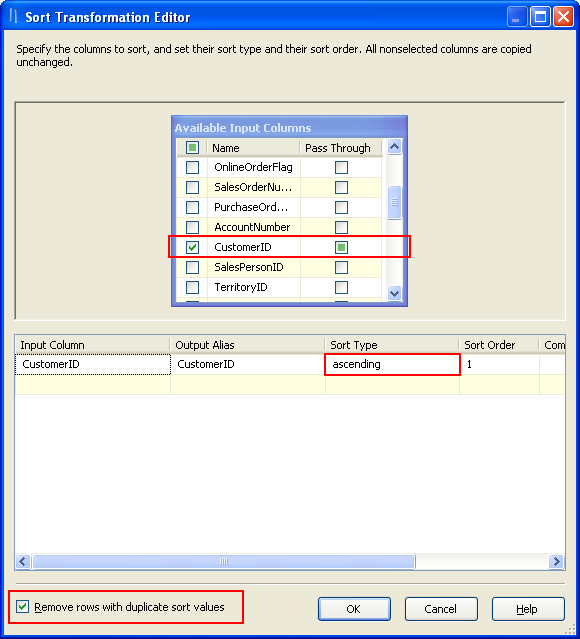
4. I planned to retrieve distinct customer ID from this table. I placed Sort control and make an input from source control. Configure "Sort" as shown below.

5. check "Remove rows with duplicate sort rows", click Ok
6. Use some destination component and configure it. Here I used Data Reader Destination which will load on memory
7. Now if you execute this package, it will return unique data with ascending order.


Total Records: 31,465 rows
Distinct Records: 19,119 rows

Wednesday, November 11, 2009

SSIS : Registry Location Of Data Source


Whenever you create a data sources in Visual studio IDE of SSIS, it will be stored in registry and it can be re used for other projects as well.


This will be available to the user login, who created it.


Data Source Manager in SSIS Designer


In the following Registry Locations, all the data sources are storing:


Registry Location:

HKEY_CURRENT_USER\Software\Microsoft\VisualStudio\9.0\Packages\{SomeGUID}\Settings\Data\Connections

How to create Data source is SSIS?


Before I explain, how to create Data source is SSIS?

We need to know the following:

  • What is Data Source?
  • What is the use of it?

A data source is a connection reference to the database, Database may be anything like SQL, Oracle, DB2, Excel, MS Access, etc.,


A data source contains the credentials of the database, which you want to access. By using this data source, we can access all the database objects like Tables, views, stored procedures, etc., Also we can perform all the database activities like creating and modifying DB objects.


I hope you understood about Data source and its usage. Now you can create the Data Source by the following way:
  1. Once you created new project in SSIS
  2. Open Solution Explorer
  3. Right click on Data Sources in Solution Explorer
  4. Select New Data Source …
  5. Data Source Wizard will open, here click “New” Button
  6. Connection Manager will open, here select the Provider which is suitable to your database
  7. then fill all the required credential of the Database
  8. Ensure you entered the correct credential by Click On “Test Connection”
  9. Click Ok to Finish

SSIS 2005 Vs. SSIS 2008 - Help Menu

SSIS 2005  - Help Menu


SSIS 2008  - Help Menu


SSIS 2005 Vs. SSIS 2008 - Tools Menu

SSIS 2005  - Tools Menu


SSIS 2008  - Tools Menu

SSIS 2005 Vs. SSIS 2008 - Debug Menu


SSIS 2005  - Debug Menu


SSIS 2008  - Debug Menu


SSIS 2005 Vs. SSIS 2008 - Build Menu

SSIS 2005  - Build Menu


SSIS 2008  - Build Menu


SSIS 2005 Vs. SSIS 2008 - Project Menu

SSIS 2005  - Project Menu


SSIS 2008  - Project Menu


SSIS 2005 - View - Other Windows Menu

SSIS 2005  - View - Other Windows Menu

SSIS 2008  - View - Other Windows Menu